
Autoteca: Car Maintenance Log
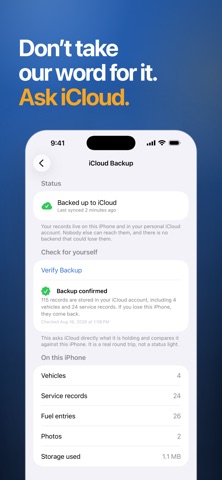
Autoteca keeps a permanent record of everything your car has been through. Every service, every fill, every mile in one archive that belongs to you. WHAT YOU RECORD - Services: 17 ready types from oil change to timing belt, plus your own - Fuel and charging: gallons, litres or kWh, with economy worked out for you - Odometer readings, kept consistent across every record - Receipt photos, attached to the record they belong to SCAN A RECEIPT Photograph the receipt and Autoteca reads the date and the total on your device. Both arrive as suggestions you confirm, never as facts written behind your back. REMINDERS THAT READ YOUR CAR Set a rule by distance, by date or both. Autoteca uses your real odometer history to work out when a service is actually due, and tells you before it arrives. WHAT IT COSTS Spending per month, per category and per mile. THE DOCUMENT A BUYER ASKS FOR Export the full service history as a clean PDF. The one thing that turns a used car with a story into a used car with proof. ANY POWERTRAIN Gasoline, diesel, LPG, hybrid and electric. A charge is recorded in kWh, not pretended to be a fill, and efficiency is shown the way your car reads it. YOURS ALONE No account. No sign up. No analytics. No ads. Your archive lives on your iPhone and syncs through your own iCloud, so it survives a lost phone but never reaches a server of ours. AUTOTECA PRO One purchase, once. Unlimited vehicles, full fuel history, the cost dashboard, PDF export and unlimited photos per record. There is no subscription. iCloud backup is never locked behind it. Terms of Use: https://click2.app/autoteca-terms-of-use Privacy Policy: https://click2.app/autoteca-privacy-policy
Screenshots




Key Features
Fast and accurate scanning
Multiple format support
History and favorites
Share and export options
Dark mode support
No ads interruption
About Autoteca
Autoteca keeps a permanent record of everything your car has been through. Every service, every fill, every mile in one archive that belongs to you. WHAT YOU RECORD - Services: 17 ready types from oil change to timing belt, plus your own - Fuel and charging: gallons, litres or kWh, with economy worked out for you - Odometer readings, kept consistent across every record - Receipt photos, attached to the record they belong to SCAN A RECEIPT Photograph the receipt and Autoteca reads the date and the total on your device. Both arrive as suggestions you confirm, never as facts written behind your back. REMINDERS THAT READ YOUR CAR Set a rule by distance, by date or both. Autoteca uses your real odometer history to work out when a service is actually due, and tells you before it arrives. WHAT IT COSTS Spending per month, per category and per mile. THE DOCUMENT A BUYER ASKS FOR Export the full service history as a clean PDF. The one thing that turns a used car with a story into a used car with proof. ANY POWERTRAIN Gasoline, diesel, LPG, hybrid and electric. A charge is recorded in kWh, not pretended to be a fill, and efficiency is shown the way your car reads it. YOURS ALONE No account. No sign up. No analytics. No ads. Your archive lives on your iPhone and syncs through your own iCloud, so it survives a lost phone but never reaches a server of ours. AUTOTECA PRO One purchase, once. Unlimited vehicles, full fuel history, the cost dashboard, PDF export and unlimited photos per record. There is no subscription. iCloud backup is never locked behind it. Terms of Use: https://click2.app/autoteca-terms-of-use Privacy Policy: https://click2.app/autoteca-privacy-policy
App Information
- Version
- 1.0.2
- Released
- Aug 21, 2026
- Price
- Free
- Platform
- iPhone & iPad
Frequently Asked Questions
What can I track in Autoteca?
Autoteca records services from 17 ready types plus your own, fuel and charging in gallons, litres or kWh, odometer readings kept consistent across every entry, and receipt photos attached to the record they belong to. Gasoline, diesel, LPG, hybrid and electric all work, and a charge is logged in kWh rather than pretended to be a fill.
Can Autoteca read a receipt automatically?
Yes. Photograph the receipt and Autoteca reads the date and the total on your device. Both arrive as suggestions you confirm, so nothing is written into your log behind your back.
How do Autoteca service reminders work?
You set a rule by distance, by date or both. Autoteca then uses your real odometer history to work out when the service is actually due and tells you before it arrives, instead of counting down a fixed interval that ignores how much you drive.
Can I export my car service history as a PDF?
Yes. Autoteca exports the full service history as a clean PDF, the document a used car buyer asks for. PDF export is part of Autoteca Pro, a single one time purchase with no subscription, and iCloud backup is never locked behind it.
Is Autoteca: Car Maintenance Log free to download?
Yes, Autoteca: Car Maintenance Log is free to download from the App Store. The app may offer optional in-app purchases for premium features.
Is my data safe with Autoteca: Car Maintenance Log?
Yes, we take privacy seriously. Autoteca: Car Maintenance Log follows strict data protection guidelines. You can read our full privacy policy for more details.
More Apps from Click2


Related Articles
Dashboard Warning Lights: What Each Symbol Means and Which Ones Mean Stop Now
9 min read
Check Engine Light On? Solid vs Flashing, the Common Causes and What to Do Next
9 min read
When to Replace Brake Pads: The Warning Signs, Minimum Thickness, and How Long They Last
9 min read
Legal Information
Ready to get started?
Download Autoteca now and experience the difference. Available for free on the App Store.
Download Autoteca for Free