
NoCaffeine: Quit Coffee
Health & Fitness
Track caffeine and quit coffee at your own pace with Decaf. Log 100+ drinks, watch a live caffeine decay curve, see when you are sleep-ready, and follow a gentle taper plan. Free for iPhone.
App Information
- Version
- 1.0.7
- Released
- Jun 2026
- Price
- Free
- Platform
- iOS
- iPhone & iPad
Screenshots



About NoCaffeine
NoCaffeine helps you take back control of caffeine, without the withdrawal crash.
Whether you want to quit coffee for good, cut back to a healthier level, or just understand how much caffeine you really drink, NoCaffeine turns a vague habit into clear numbers and a gentle plan.
How it works
- Log what you drink. Coffee, espresso, tea, energy drinks, soda and more, from a database of 80+ drinks.
- See caffeine in your body. A live decay curve shows how much is still in your system and when you will be sleep-ready.
- Cut back at your pace. Choose to quit, reduce or simply track, then follow a gentle weekly taper that lowers your limit without the headaches.
- Private iCloud sync across your devices
Why NoCaffeine
Most trackers just count milligrams. NoCaffeine is built to help you change the habit: a real taper, honest data, and small wins that add up. Less caffeine, more you.
NoCaffeine Pro unlocks the full drink database, custom drinks, the reduction plan, advanced stats and PDF reports.
Terms of Use: click2.app/decaf-terms-of-use
Privacy Policy: click2.app/decaf-privacy-policy
Key Features
- Fast caffeine logging with serving sizes
- Live "in your system" curve based on caffeine half-life
- Sleep-ready time so late cups stop wrecking your sleep
- Personalized reduction plan: gentle, steady or fast
- Daily goal ring and streaks to keep you on track
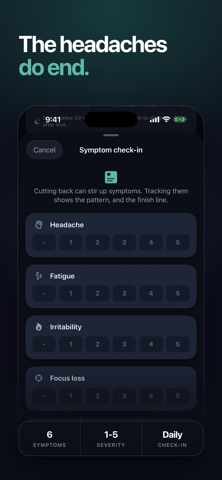
- Withdrawal symptom check-ins with reassurance
- Stats: weekly trends, top drinks, riskiest hour, coffee spend
- Milestones and badges for every caffeine-free day
- Home Screen and Lock Screen widgets
- Apple Health sleep insights
Frequently Asked Questions
How does Decaf track caffeine in my body?
Can Decaf help me quit coffee without withdrawal?
What drinks can I log in Decaf?
Is NoCaffeine: Quit Coffee free to download?
Is my data safe with NoCaffeine: Quit Coffee?
Related Articles
Health & Fitness
Caffeine in Tea vs Coffee: How Much Is in Black, Green, Matcha and Herbal Tea
7 min read
Health & Fitness
How Much Caffeine Is in Decaf Coffee? The Real Numbers, and Whether Decaf Is Bad for You
8 min read
Health & Wellness
Does Coffee Dehydrate You? What the Studies Actually Found
7 min read


